Reticulum: Chapter 6 — Configure Reticulum on the Pi
Bringing Reticulum to life
Both of my Heltec devices are flashed and sitting on the Pi’s USB ports. Right now, they’re just radio modems — verified hardware with firmware on them, but nothing is actually using them – yet. This chapter is where I bring Reticulum to life: creating the config file that tells rnsd about both RNode interfaces, setting the EU-compliant radio parameters I worked out in Chapter 2, and enabling Transport mode so this Pi becomes genuine mesh infrastructure rather than just an endpoint. Getting this config right is probably the most consequential step in the whole build — everything from here depends on it.
Step 1: Generate the default config
Reticulum creates its config directory and a default config file the first time rnsd runs. I’ll start it briefly just to generate that file, then stop it:
source ~/rns-env/bin/activate
rnsd &
sleep 3
kill %1
Now the config exists and I can open it:
nano ~/.reticulum/config
What I see is a default config with a “[reticulum]” section at the top and an “[interfaces]” section below it containing a default “AutoInterface” entry — that’s a LAN multicast interface that’s harmless to leave in place, it just won’t find anything useful in my setup right now. I’ll leave it and add my RNode interfaces alongside it.
Step 2: Enable Transport mode
At the top of the file I find the “[reticulum]” section. I want to set two things here:
[reticulum]
  enable_transport = True
  share_instance = Yes
enable_transport = True — is what promotes this Pi from a simple endpoint into a proper Transport Node. Meaning that it will actively forward traffic between its interfaces on behalf of other nodes, which is the foundation of everything in Chapter 11’s growth plan. Without this, my Pi can only send and receive its own traffic, not relay for others.
share_instance = Yes — means multiple local programs (rnsd, Nomad Network, diagnostic tools) can all share the same running Reticulum instance rather than fighting over the interfaces. This will matter more in Chapter 9 when I add Nomad Network on top.
Step 3: Add the RNode interface for Node 1
Inside the “[interfaces]” section I add my first RNode block:
  [[RNode Node1]]
    type = RNodeInterface
    interface_enabled = true
    port = /dev/ttyACM0
    frequency = 869525000
    bandwidth = 125000
    txpower = 14
    spreadingfactor = 9
    codingrate = 5
    airtime_limit_long = 10
    airtime_limit_short = 25
Let me walk through each setting and why I’ve chosen it, because these aren’t arbitrary numbers — they each connect back to decisions I made earlier:
frequency = 869525000 — 869.525MHz, sitting in the P sub-band (869.4–869.65MHz). I chose this in Chapter 2 specifically because the P sub-band gives me a 10% duty cycle allowance instead of the 1% limit on the crowded M sub-band channels around 868MHz. More breathing room for mesh traffic.
bandwidth = 125000 — 125kHz is the standard LoRa bandwidth and a good balance of range versus data rate. I’m starting here and will tune later if needed.
txpower = 14 — 14dBm works out to roughly 25mW, matching the ≤25mW ERP carrier power limit I noted in Chapter 2. I’m starting at the legal ceiling rather than below it to give myself the best possible link margin, especially once the nodes are physically separated.
spreadingfactor = 9 — SF9 is my chosen middle ground. SF7 or SF8 would be faster and use less airtime, but shorter range. SF11 or SF12 would be extremely long range but painfully slow and very airtime-hungry given my duty cycle budget. SF9 feels like the right starting point for two nodes that aren’t many kilometers apart yet — I can always tune this once I know what the actual RF environment looks like.
codingrate = 5 — the most efficient forward error correction setting. I’m not fighting heavy interference right now, so there’s no reason to use a more conservative (slower) coding rate yet.
airtime_limit_long = 10 and airtime_limit_short = 25 — these are the settings I’m genuinely glad exist. The long-term limit enforces my legal 10% P-band duty cycle over a rolling 60-minute window, and the short-term limit manages brief burst behavior over roughly a 15-second window. What I appreciate about these settings is that they make the firmware itself enforce my legal duty cycle limits regardless of what the application layer tries to send — it’s a practical safety net built into the config, not just something I have to remember to respect manually.
Step 4: Add the RNode interface for Node 2
Same block, different name and port — but, and this is critical, they are set to use the identical frequency and radio parameters:
  [[RNode Node2]]
    type = RNodeInterface
    interface_enabled = true
    port = /dev/ttyACM1
    frequency = 869525000
    bandwidth = 125000
    txpower = 14
    spreadingfactor = 9
    codingrate = 5
    airtime_limit_long = 10
    airtime_limit_short = 25
The frequency must match exactly between both nodes, that’s non-negotiable, or else they won’t hear each other. Everything else (power, SF, airtime limits) should also match for predictable, symmetric behavior across the link, though strictly speaking only frequency and bandwidth need to be identical for basic communication.
One thing I’m conscious of right now: both radios are physically sitting a few centimeters apart on my bench, transmitting at 14dBm. That’s actually fine for testing — an overly strong signal up close doesn’t cause the kind of problems a weak signal does, and I’ll see the real link behavior once the nodes are separated. What I won’t do is crank the power up too high while they’re side by side; that tells me nothing useful and wastes airtime budget.
Step 5: Save and do a live syntax check
I save the file (Ctrl+O, Enter, Ctrl+X in nano) and then start rnsd in the foreground so I can watch the output directly:
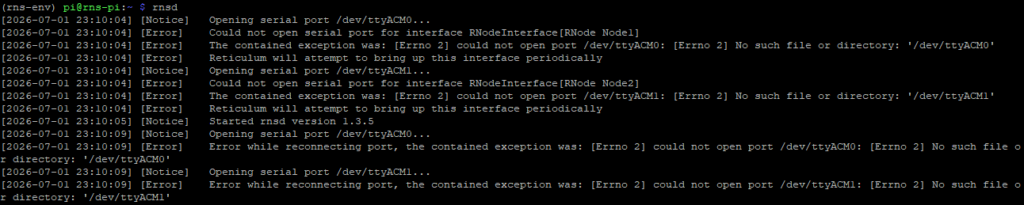
rnsdI’m watching for both RNode interfaces to initialize cleanly. The output should show each one coming online, reporting its detected hardware, firmware version, and frequency. If there’s a config syntax error or a wrong port path, rnsd will usually say so clearly right here rather than failing silently. This is the moment I find out if I’ve made any typos.
If both interfaces show as online without errors, I leave rnsd running in this terminal and open a second SSH session to the Pi for any further work — I don’t want to kill the running daemon just to run a command.
Successful initialization example:

Unsuccessful initialization example:
Where I am now
Both RNode interfaces are configured with EU-compliant, duty-cycle-enforced settings. The Pi is running as a Transport Node with rnsd active and both radios online. What I have at this point is a properly configured Reticulum backbone — two radio interfaces, legal parameters, automatic duty cycle enforcement, and Transport mode enabled. In Chapter 7 I’ll work through deploying Node 2 to its eventual remote location and what compute it needs to run Reticulum independently once it’s no longer plugged into this Pi.