Reticulum: Chapter 5 — Flash the Second Heltec V4
Rinse & Repeat…
Node 1 is sitting on my bench, flashed and verified. Now I need to do the same for Node 2 — the board that will eventually live at a remote location. The flashing process is identical to Chapter 4, but there are a few extra things to think about when two boards are connected to the same Pi simultaneously, and this is also the chapter where I start making decisions about how Node 2 will eventually be deployed. I’ll work through all of that here.
Step 1: Antenna first — same rule, no exceptions
Before I touch the USB cable, the 868MHz antenna goes on Node 2. Same rule as Chapter 2 and Chapter 4 — antenna on before power, every single time. Once it’s attached, I connect Node 2 to a second USB port on the Pi 3.
Step 2: Confirm both devices are visible
With both Heltecs now connected, I check what the Pi sees:
ls /dev/ttyUSB* /dev/ttyACM*
I should now see two device paths — typically /dev/ttyACM0 and /dev/ttyACM1. The important thing here is knowing which path belongs to which board. My method: unplug Node 2, run the ls command, note what’s there — that’s Node 1’s path. Plug Node 2 back in, run ls again, note what’s new — that’s Node 2’s path. Takes thirty seconds and removes all ambiguity.

Step 3: Target the autoinstaller at the correct port
Since both boards are plugged in, I want to be explicit about which one I’m flashing rather than relying on the tool’s auto-scan to pick the right one. I target Node 2’s port directly:
source ~/rns-env/bin/activate
rnodeconf /dev/ttyACM1 --autoinstall
Substituting whichever path I confirmed in Step 2 belongs to Node 2. Being explicit here means there’s zero chance I accidentally reflash Node 1.

I ran into an issue with specifying the /dev/ttyACM1 and getting the node to flash. I ended up just unplugging the first device and then running the command below with only the second device connected: rnodeconf --autoinstall
Then I unplugged both devices and plugged them back in the order that I flashed them. so their /dev/ttyACM* number would match up to what I wanted.
Step 4: Walk through the same prompts as Chapter 4
The sequence is identical — board selection (Heltec V4), experimental warning (hit Enter), frequency/region (868MHz EU — same as Node 1, because both radios need to be on the same channel to hear each other), confirmation screen, flash. If the shutdown step hangs at the end, same fix: press the physical reset button on Node 2 and watch its OLED.
Step 5: Verify from the Pi
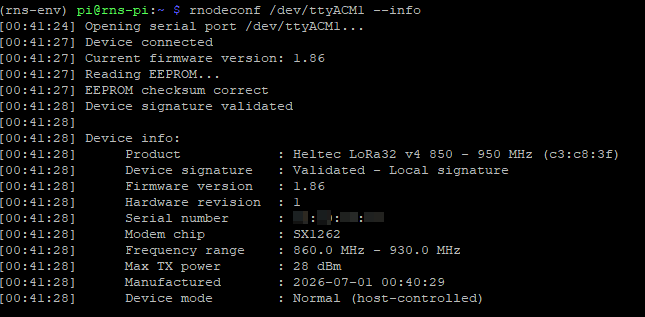
rnodeconf /dev/ttyACM1 --info
I’m checking the same things as Chapter 4: firmware version confirmed, frequency showing 868MHz, EU region set. Both boards should now report identical firmware and region configuration — the only difference between them is which USB port they’re on and the label I put on them.
Step 6: Label it immediately
Node 2 gets a piece of tape too: “Node 2 / Remote”. They’re physically identical boards and I do not want to discover I’ve been working on the wrong one an hour from now.
Step 7: A decision I’m flagging now for later
Both nodes are flashed and both are currently sitting on the Pi’s USB ports. Eventually Node 2 needs to move to its permanent remote location — but before I worry about that, I want to prove the radio link actually works with both boards close at hand where I can troubleshoot easily. Deploying first and debugging remotely is the harder path, so I’m deliberately keeping both on the bench until Chapter 8 gives me confidence the link is solid.
When Node 2 does move, it needs its own compute running Reticulum — as I covered in Chapter 1, the Heltec itself has no intelligence without something running rnsd alongside it. My plan, which I’ll work through properly in Chapter 7, is a Pi Zero 2 W as Node 2’s dedicated compute. That’s on order. In the meantime, both boards stay on the Pi 3 for everything through Chapter 8.
One option I’m also curious about exploring later — once I’m comfortable with the standard RNode setup — is standalone bridge firmware for the Heltec that can connect a LoRa network directly to a WiFi/TCP backbone without needing a separate compute at all. I’m treating that as a future experiment rather than part of this initial build, but it’s worth knowing the option exists.
Where I am now
Both Heltec V4 boards are flashed with EU 868MHz RNode firmware, both verified from the Pi, both labelled. Node 1 is on /dev/ttyACM0, Node 2 is on /dev/ttyACM1, and both OLEDs are showing RNode status. In Chapter 6 I’ll configure Reticulum on the Pi — setting up both RNode interfaces with EU-compliant radio parameters and enabling Transport mode — which is where these two radios actually become part of a working mesh rather than just individually flashed modems.